An AI compliance dashboard for compliance officers
Auditrek's compliance dashboard is one web screen that answers the four questions an examiner or an internal auditor tends to ask first: how many AI decisions are logged, which systems are connected, when the last report was generated, and whether the record chain still verifies. It is built for the compliance officer who owns the answer, not for the ML engineer who owns the pipeline.
Auditrek is not open yet, so anything on this page about what it does is what it is being built to do.
The evidence exists, it just isn't yours to read
- Freshness. The number in your memo was true the day the export ran, and nobody knows whether it is true now.
- Integrity. A CSV pulled from a mutable store carries no evidence that the rows were not edited between the event and the export.
- Provenance. You are attesting, in your own name, to something you did not observe and cannot re-derive.
Your inference events are already written down somewhere: a log group, an object store prefix, a monitoring job configured by someone on the platform team eighteen months ago. None of that is a place a compliance officer can open on the Tuesday afternoon an information request lands. So the work becomes a relay, in which you raise a ticket, an engineer exports a CSV, and a screenshot pasted into a memo becomes the record.
Survey work published in 2026 put the share of organisations with tamper-evident audit trails in place at a third, which is the gap those three lines describe. Article 12 of the EU AI Act concerns record-keeping and logging, Article 13 concerns the information provided about a system, and answering for either from a screenshot is an uncomfortable position for the person whose signature goes on the filing. The dashboard removes the relay: four figures, each derived from records Auditrek holds, on a screen you open yourself.
How the dashboard gets its four numbers
None of the four tiles is a typed-in summary. Each one is read from the same ledger your pipeline writes into, and each is gated by a step that happens before it can move. The sequence below is the whole path, from the data processing agreement that has to exist before a system is allowed to send anything, to the report date that tells you how stale your evidence pack has become.
Step one, record the DPA, then connect the system
An ai_system cannot be connected until a dpa_confirmation with a signed_at date is recorded against it, so no API key and no webhook secret exist before that. The check runs server-side on the connect endpoint and returns a 403 with a descriptive message when the signature is missing, which means the systems connected tile counts only systems that cleared that gate.
Step two, point the pipeline at the ingestion endpoint
Your team sends inference events to a REST endpoint or a webhook: input hash, model id and version, output, confidence, timestamp, and the human override flag. Ingestion is a generic REST and webhook layer with documented payload mapping guides for AWS SageMaker and Azure ML, and there are no bespoke platform SDKs in this first release, with deeper native integrations fast-follow rather than build-time scope.
Step three, let the minimisation gate refuse what should not be stored
Before any database write, the ingestion API inspects the payload for recognisable raw sensitive-field patterns, such as SSN formats, ICD-10 style diagnosis codes and unredacted credit bureau fields, and rejects the request with a 422 and a clear error body. Subject identifiers are pseudonymised by default, so what accumulates behind the dashboard is a decision ledger, not a copy of the applicant file.
Step four, watch decisions logged accumulate
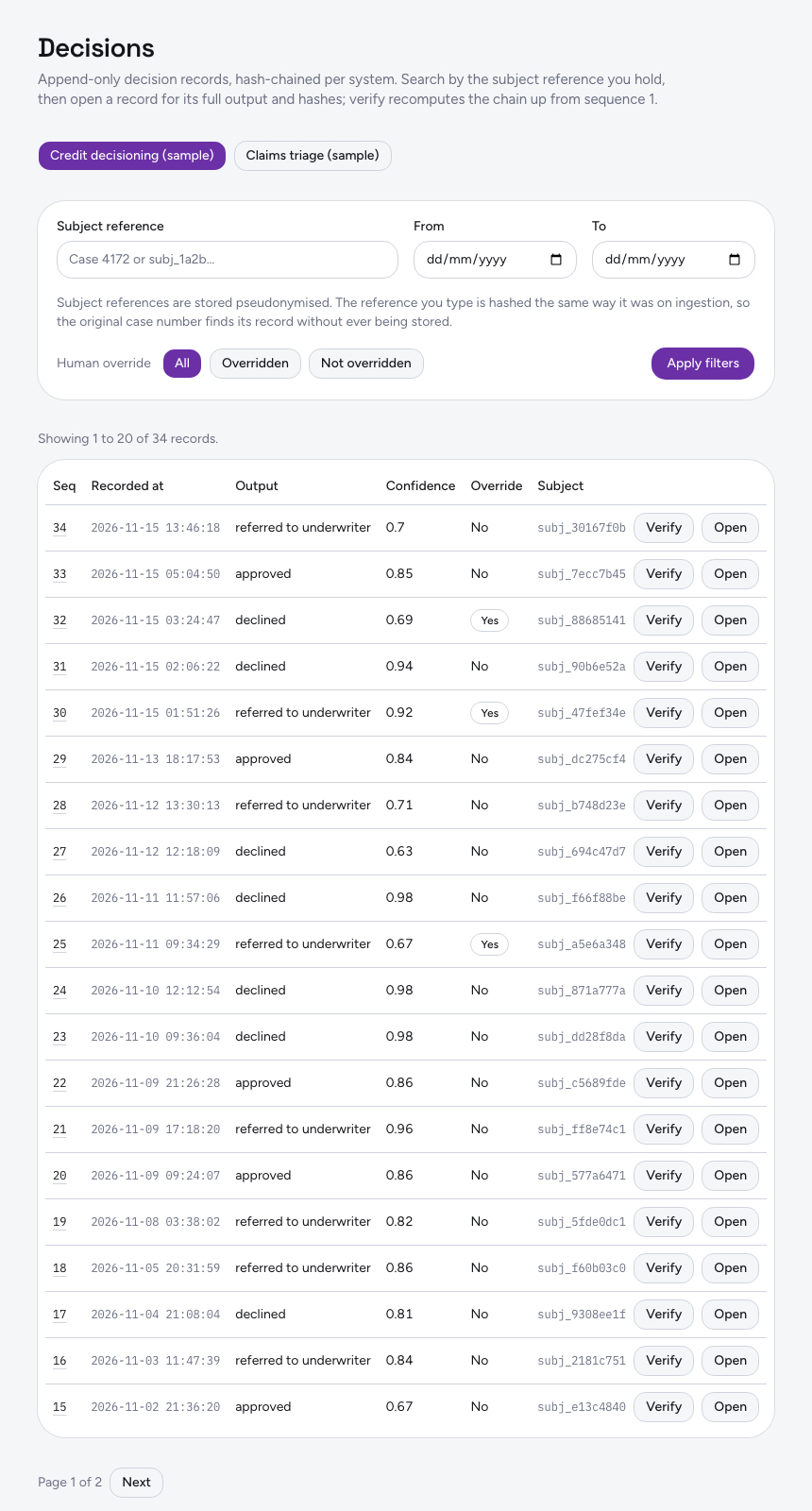
Each accepted event is stored as an append-only decision record for that ai_system, with a sequence number and a SHA-256 hash computed from the previous hash and the record payload, written atomically in a transaction. The decisions logged figure counts those records rather than a rolled-up estimate kept in a separate table, and the decisions list pages through them for a selected system, with sequence number, timestamp, output summary, confidence, human override, and a per-record verify action that returns the tamper status inline.
Step five, recompute the tamper status, and date the last report
Verification is not a stored badge: Auditrek walks the chain for a system from sequence one, recomputes each hash from the stored previous hash and payload, and returns a tamper status of valid or broken, naming the first broken sequence number when a recomputation does not match. For a chosen system and date range it then produces a PDF or HTML report structured to EU AI Act Article 12 and 13 fields, with a non-legal-advice disclaimer embedded on every page of output and one regulation and one format set at launch, and the last report generated tile shows when that most recently happened.
What each tile states, and what it does not
| Tile | What it is derived from | What it does not tell you |
|---|---|---|
| Decisions logged | A count of append-only decision records held per connected AI system | Whether your pipeline sent every event it produced, which is a question about your instrumentation |
| Systems connected | AI systems with a recorded DPA confirmation and issued credentials | Anything about systems in your inventory that have not been connected |
| Last report generated | The most recent report structured to Article 12 and 13 fields for a system and date range | Whether a supervisory authority will find that report sufficient |
| Tamper status | A server-side recomputation of the hash chain from sequence one | Whether the event was correct at source, only whether the stored chain recomputes consistently |
What that buys you in practice
A figure you can state without raising a ticket
Decisions logged and systems connected are on the screen when you open it. You are not waiting on an export from the platform team, and you are not quoting a number that was true last quarter.
Integrity you can re-derive on demand
Because tamper status is recomputed by walking the chain rather than read from a flag, the answer is produced at the moment you ask. When it comes back broken, it names the first sequence number where recomputation failed, which is a place to start looking rather than a vague alarm.
Report recency made visible
Evidence packs go stale quietly. Putting the last report generated date on the same screen as the decision count makes the gap between logging and documenting hard to miss, and gives you a date range to regenerate before a deadline rather than after it.
Written for the person who signs, not the person who deploys
The dashboard is the non-technical surface over a technical ledger. The single piece of engineering work, mapping your inference payload to the ingestion schema, happens once per system and is documented for AWS SageMaker and Azure ML.
Shared with the colleagues who need the same view
Access is auth-gated and multi-user within your organisation, with sign-in by email and password, so second line, internal audit and the owning engineer are reading the same four figures rather than three different exports.
Works with
Decision capture API
The REST and webhook endpoint that accepts inference event payloads is what moves the decisions logged tile.
Hash-chained records
Append-only records, each carrying a sequence number and a SHA-256 hash over the previous hash and the payload, are the chain the tamper status tile is computed from.
Tamper verification
The recomputation behind the tamper status tile: the server walks the chain from sequence one and returns valid or broken, with the first broken sequence number.
Audit reports
The PDF and HTML generator for a chosen system and date range is what dates the last report generated tile.
Where Auditrek is today
Auditrek is in build and open for waitlist access, so there are no customer stories on this page and no adjective standing in for a mechanism. What is described above is what the product is being built to do: capture decision records through a REST and webhook API, chain them with SHA-256, verify them server-side by recomputation, refuse payloads carrying recognisable raw sensitive fields, pseudonymise subject identifiers by default, and put the resulting state on one screen.
If you are the person who will be asked, in an examination or a board paper, how many AI decisions your organisation has on record and whether that record has changed since it was written, join the waitlist and we will show you the ledger rather than the pitch. The site's terms and privacy policy name the company that sells Auditrek, and email reaches us at hello@kaleidoapps.com.
Questions
Do I need to be technical to use the dashboard?
No. The dashboard is built for a non-technical compliance officer audience: decisions logged, systems connected, last report generated and tamper-verification status, in plain figures. The one technical task is mapping your inference payload to the ingestion schema, which your ML team does once per system using the documented guides for AWS SageMaker and Azure ML.
What exactly does the tamper status check?
It walks the hash chain for the record's AI system from sequence one to the record's sequence number, recomputes each hash from the stored previous hash and payload, and returns valid or broken. If a recomputation does not match, it returns the first broken sequence number. It is a server-side recomputation, not a status flag written at insert time and read back.
What happens if a pipeline sends raw sensitive data?
The ingestion API inspects each payload for recognisable raw sensitive-field patterns, including SSN formats, ICD-10 style diagnosis code patterns and unredacted credit bureau fields, and rejects the request with a 422 and a clear error body before anything is written to the database. Subject identifiers that do pass are pseudonymised by default.
Can a system start sending events before the DPA is recorded?
No. The connect endpoint checks server-side that a dpa_confirmation with a signed_at value exists before issuing an API key or webhook secret, and returns a 403 with a descriptive message if it does not. The check is not client-side state, so it cannot be skipped from the browser.
Which AI platforms can feed the dashboard?
Ingestion is a generic REST and webhook layer, with documented payload mapping guides for AWS SageMaker and Azure ML. There are no bespoke platform SDKs in this first release; deeper native integrations are fast-follow rather than build-time scope.
Can risk and engineering colleagues see the same screen?
Yes. Access is auth-gated and multi-user within an organisation, using email and password sign-in. There is a separate page on multi-user org access if you want the detail on how compliance, risk and engineering share one workspace.
How is it priced?
Two plans are declared. Starter is €1,500 a month for 2 connected AI systems and 50,000 decision records a month; Growth is €3,500 a month for 5 connected systems and 500,000 decision records a month. Both carry a 30-day free trial with no card to start. Payments are processed through Stripe, the service is hosted on Amazon Web Services in a single region with no choice of data residency, and sign-in is email and password.
Is a generated report something I can hand to a supervisory authority?
The report is a descriptive, structural record of what a given AI system did over a chosen date range, produced as PDF or HTML and organised against EU AI Act Article 12 and 13 fields. Every page carries a footer stating that the output does not constitute legal advice and has not been reviewed by qualified regulatory counsel. What an authority will accept is a judgement for you and your counsel, not for us.