Audit report generator for EU AI Act Article 12 and 13 fields
If you are looking for software that turns AI decision records into a document you can hand to an examiner, this is that capability: Auditrek's report generator produces PDF and HTML output for one chosen ai_system and date range, structured around the EU AI Act Article 12 and Article 13 field set.
Auditrek is not open yet, so anything on this page about what it does is what it is being built to do.
The request arrives narrow, and the document does not exist
An examination request is rarely broad. It names one system, one window of time, and asks what that system decided and on what basis. The evidence usually exists somewhere: inference logs in a cloud log group, model monitor output, override notes in a ticketing system, a spreadsheet someone maintains by hand. What does not exist is a document.
So the document gets assembled, and the assembly is the problem. A week of copy and paste produces a file whose provenance nobody can reconstruct afterwards. The structure changes between the first request and the second, because a different analyst built it. Values get transcribed by hand. And the finished file carries no statement of what it is, which leaves a reader free to treat it as an opinion on your organisation's position rather than a record of events.
Auditrek's generator removes the assembly step. It reads the decision records already held for one ai_system, renders them into a fixed structure organised around the EU AI Act Article 12 and Article 13 field set, and outputs the result as PDF or HTML for the date range you choose. The field-by-field reading of what Article 12 asks a log to contain is a separate page in this pillar, as is the override flag that carries human oversight evidence.
The structure is deliberately descriptive. It sets out what the system did and when. It does not assert what you are required to do, and it does not state whether your current practices satisfy any obligation. That boundary is enforced inside the output: the line this report does not constitute legal advice and has not been reviewed by qualified regulatory counsel is hardcoded as a visible footer on every page and section, in both the PDF and the HTML render path.
How a report gets generated
- Choose the system
A report covers one ai_system, not your whole estate. That matches how requests arrive and keeps the scope of the document unambiguous: one registered system, one set of records, one ledger.
- Set the date range
You pick the start and end of the period the report covers, and the generator reads the decision records captured for that system inside the window. Keep the range to the period the request actually names rather than reaching for the widest window available.
- The generator maps records to the Article 12 and 13 field set
One regulation and one format set are in scope at launch: the EU AI Act, Article 12 and Article 13 fields. The generator arranges the captured record fields into that structure rather than asking you to decide where each value belongs.
- Take the output as PDF or HTML
Both render paths produce the same structure for the same system and range. The PDF is the file that leaves the building; the HTML render sits on the report's page inside the app for a reviewer who wants to read it without downloading anything.
- The disclaimer is embedded, not appended
The non-legal-advice string is hardcoded into both render paths as a visible footer on every page and section. It is covered by a test that generates a sample report, so it cannot quietly fall out of a template revision.
- Verify the chain separately from the document
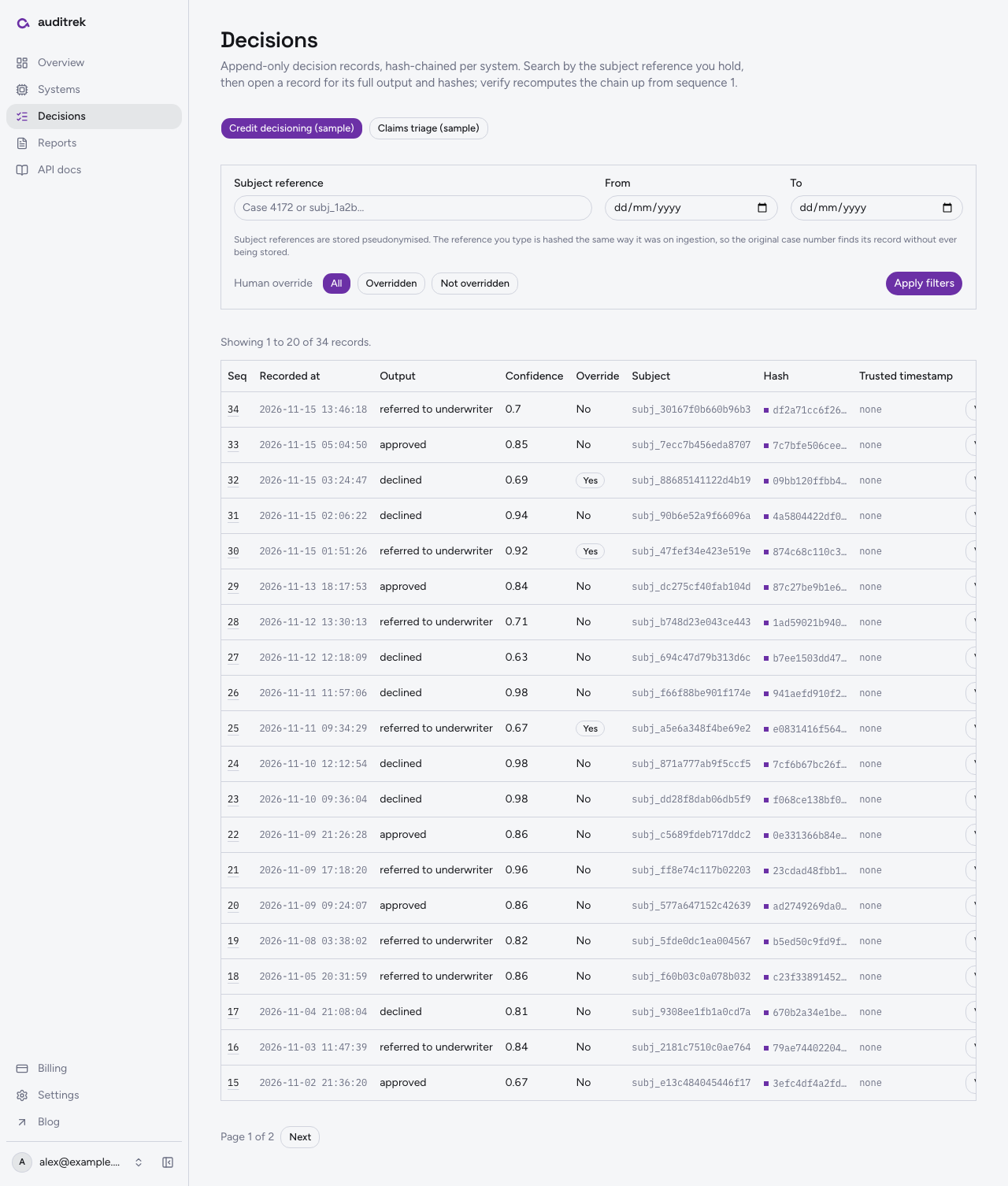
The records the report draws on are stored as SHA-256 hash-chained append-only entries per ai_system. A server-side endpoint walks the chain from sequence one, recomputes each hash from the stored previous hash and payload, and returns a tamper status with the first broken sequence number instead of reading back a stored flag.
- See the state of the evidence on the dashboard
The compliance dashboard shows decisions logged, systems connected, tamper-verification status, and when the last report was generated, so the person answering the request can see where things stand without reading code.
What each record carries into the report
| Record field | What it holds | Why it is in this form |
|---|---|---|
| Input hash | A one-way digest of the input to the inference | The report can show that a specific input was processed without the raw input living in the ledger |
| Model id and version | Which model, at which version, produced the output | A period often spans more than one version, and the distinction matters when questions narrow |
| Output | The decision or score the system returned | The event being documented is the output itself, so it is recorded rather than summarised |
| Confidence | The confidence value the system returned, where one exists | Recorded as captured, with no interpretation applied by Auditrek |
| Timestamp | The time of the inference event, as your pipeline reported it | Recorded as sent, so the report shows the sequence of events in the terms your own systems used |
| Human override flag | Whether a person overrode the system output | Human oversight questions arrive constantly, and the answer should be a field rather than an email thread |
What the generator gives you
The same structure every time
The second request is answered in the same shape as the first, because the mapping to the Article 12 and 13 field set lives in the generator and not in an analyst's memory of how they did it last time.
Two outputs, one structure
HTML for the reviewer reading a period on the report page inside the dashboard, PDF for the file that goes out. Both carry the identical field structure and the identical embedded footer.
Records you can verify separately from the document
The decisions behind a report are hash-chained append-only entries per ai_system, and the verification endpoint recomputes the chain server-side rather than trusting a flag, returning the first broken sequence number when the recomputation does not match.
The records arrive by API, not by migration
Decision records reach Auditrek through a generic REST and webhook ingestion layer, with documented payload mapping guides for AWS SageMaker and Azure ML. Nothing about generating a report asks you to move a model or change the production inference path.
Framing that travels with the file
A report circulated internally for months still says, on every page, that it is not legal advice and has not been reviewed by qualified regulatory counsel. You are not relying on whoever forwarded it to explain what it is.
Scope at launch, and what happens next
Being specific about the edges is more useful than a long feature list.
- One regulation and one format set are in scope: the EU AI Act, Article 12 and Article 13 fields. There is no second framework in the generator today.
- One report covers one ai_system over one date range. There is no cross-estate roll-up document.
- Output is PDF and HTML, both carrying the embedded non-legal-advice footer on every page and section.
- The records come from the REST and webhook ingestion layer, with documented payload mapping guides for AWS SageMaker and Azure ML. There are no bespoke platform SDKs in this release.
- What the chain gives you is evidence that stored records have not been altered since they were written and recomputed. Auditrek does not issue a trusted third-party time-stamp token, so treat the time values in a report as the times your own pipeline reported, not as times attested by anyone else.
Auditrek runs on Amazon Web Services, and people sign in with email and password. A system cannot be connected at all, meaning no API key and no webhook secret are issued, until a DPA confirmation with a signed_at value is recorded, and the check is enforced server-side. The ingestion API also inspects payloads for recognisable raw sensitive-field patterns and rejects them before any database write, while pseudonymising subject identifiers by default. The DPA gate has its own page in this pillar if that is the part your privacy team will ask about first, and the question of when high-risk obligations start applying is answered on the timeline page.
Auditrek is not open to general sign-up yet. If you are the person who will be asked to produce this document, join the waitlist and tell us which system you would register first and which period you expect to be asked about.
Questions
What formats does the audit report generator output?
PDF and HTML. Both render paths produce the same structure for the chosen system and date range, and both embed the non-legal-advice footer on every page and section.
Can one report cover several AI systems?
No. A report is scoped to one ai_system and one date range, which matches how examination requests usually arrive. If you need to answer for two systems, you generate two reports.
Does the report cover the whole EU AI Act?
No. One regulation and one format set are in scope at launch: the Article 12 and Article 13 field set. The generator arranges your captured decision records into that structure and nothing wider.
Does a generated report mean our AI system meets its obligations?
No, and the output says so. Every page carries the line stating that the report does not constitute legal advice and has not been reviewed by qualified regulatory counsel. The report is a descriptive record of what a system did and when; whether that satisfies an obligation is a judgement for you and your counsel.
Where does the data in the report come from?
From decision records sent to Auditrek's REST and webhook ingestion API as inference events, carrying input hash, model id and version, output, confidence, timestamp and a human override flag. Documented payload mapping guides cover AWS SageMaker and Azure ML.
How do I know the records behind a report were not altered?
Records are stored as SHA-256 hash-chained append-only entries per ai_system, where each record's hash is computed from the previous hash and the record payload. A server-side verification endpoint walks the chain from the first sequence, recomputes each hash, and returns a tamper status with the first broken sequence number rather than trusting a stored flag.
Does connecting a pipeline require paperwork first?
Yes. No API key or webhook secret is issued for an ai_system until a DPA confirmation with a signed_at value is recorded, and the check is enforced server-side so it cannot be bypassed from the client.
Can I use it today?
Auditrek is on a waitlist. Nothing described here is a live customer result; it is what the product is built to do, and the waitlist is where you tell us which system and period you need covered first.