Multi-user org access for compliance, risk and engineering in one workspace
Auditrek gives your organisation one auth-gated workspace where the compliance officer, the risk lead and the engineer who owns the inference pipeline all read the same hash-chained decision records. Access is scoped to your org and sits behind email and password sign-in, so nobody has to forward a screenshot to prove what a model did.
Auditrek is not open yet, so anything on this page about what it does is what it is being built to do.
The question arrives in one inbox, the records sit in someone else's console
A supervisory query, or an internal risk committee agenda item, does not arrive at the pipeline. It arrives with one person, usually the compliance officer, and it asks for something narrow: the record of this AI system, over this period, including the cases where a human overrode the model.
The records that answer it are somewhere else. They live in the log sink the platform team owns, behind console permissions the compliance officer does not have and probably should not be handed casually. So evidence moves by hand. Someone exports a CSV. Someone pastes a chart into a slide deck. The only surviving account of when a person intervened in an automated decision ends up in a chat thread with no ordering guarantee at all.
Every hand-off is a place where the chain-of-custody argument gets thinner, and every hand-off costs an engineer an afternoon they did not plan for. The failure is not that the data is missing. It is that the people who have to explain it and the people who can reach it are working in two different systems.
Auditrek's answer is deliberately unglamorous: put the records and the people who need them inside the same auth-gated workspace, scoped to your organisation. Multi-user org access is what turns a hash-chained ledger from an engineering artefact into records a non-technical reviewer can open on their own.
How org access works in Auditrek
- One org, one ledger per AI system
Decision records arrive over the REST and webhook API carrying input hash, model id and version, output, confidence, timestamp and a human override flag. They are stored as SHA-256 hash-chained, append-only records per ai_system, each with a sequence number and the hash of the record before it. The org is the boundary drawn around those chains, so there is one copy of the ledger rather than one per team.
- Everyone signs in the same way
People sign in with email and password, and the workspace is auth-gated using the existing auth scaffolding, with no custom single sign-on beyond that at launch. Each member holds their own credentials rather than sharing one login, which is the whole point of org access. There is no self-service password reset and no email verification flow yet, so credentials are worth storing properly from the first day.
- Colleagues join the workspace, not a copy of it
Once someone has org access they open the same compliance dashboard everyone else sees: decisions logged, systems connected, when the last report was generated, and tamper-verification status. It is built for a non-technical reader to work through without an engineer sitting next to them.
- The DPA gate sits inside the shared workspace
An ai_system cannot be connected until a dpa_confirmation with a signed_at value is recorded: no API key and no webhook secret are issued before then, and the check is enforced server-side rather than in the browser. Because the legal step and the technical step happen in the same place, the person who signs and the person who wires up ingestion are not coordinating across email.
- What reaches the shared ledger is minimised first
Ingestion applies a data-minimisation gate. Payloads carrying recognisable raw sensitive fields, such as SSN formats or ICD-10 style diagnosis codes, are rejected with a clear error before any database write, and subject identifiers are pseudonymised by default. Widening who can read the ledger therefore does not widen who can read the underlying case file.
- Reports and verification come from the same records
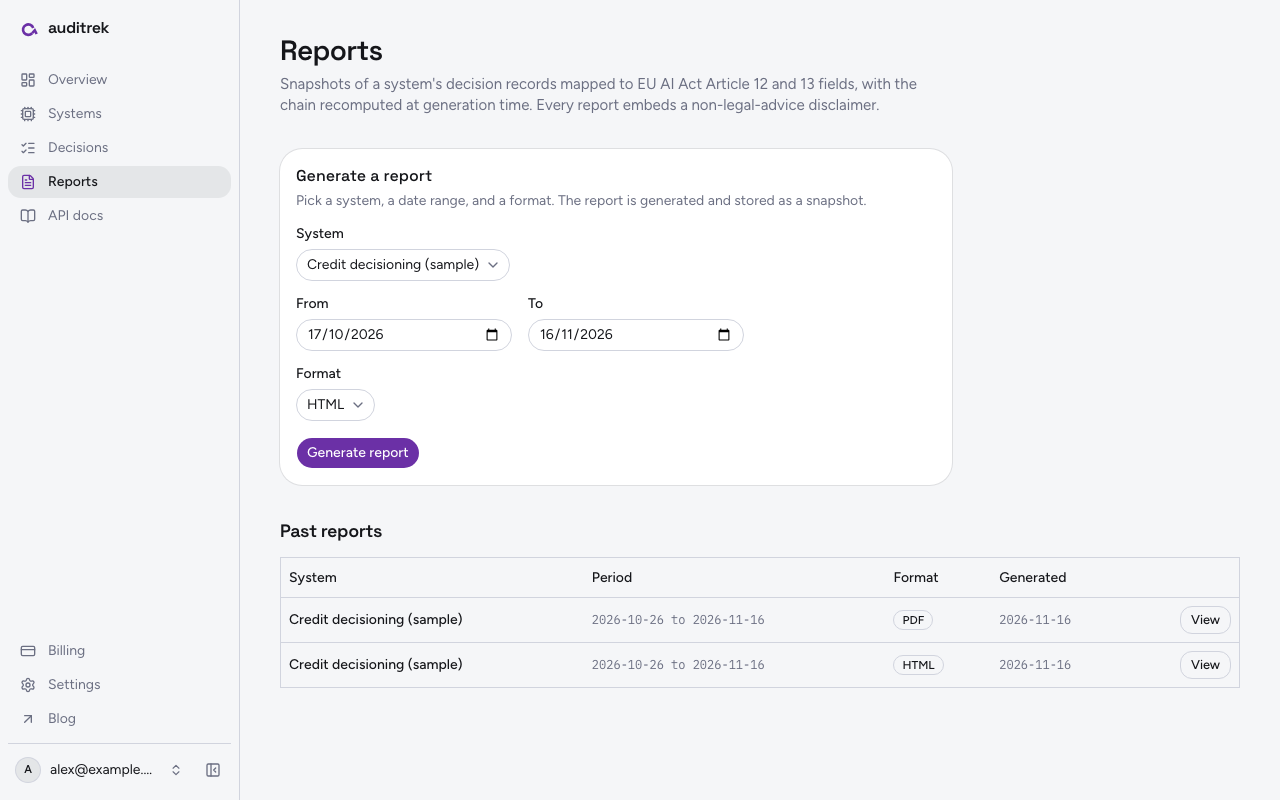
Anyone with org access can generate a report for a chosen system and date range, as PDF or HTML, mapped to EU AI Act Article 12 and 13 fields and carrying an embedded statement that it does not constitute legal advice and has not been reviewed by qualified regulatory counsel. The verification endpoint walks the chain for that system from sequence one, recomputes each hash from the stored prev_hash and payload, and returns a tamper status rather than reading a stored flag.
What shared access actually changes
The person answering the question can open the answer
The compliance officer reaches decisions logged, systems connected and tamper-verification status directly from the dashboard, and generates the report for the system and date range in scope without raising a ticket against the platform team.
No evidence in transit
Nothing has to be exported, screenshotted or re-keyed to get from the pipeline to the filing. The record a reviewer reads is the record that was written, in sequence, in the same append-only chain.
Verification is a recomputation, not one team's assertion
Instead of an engineer telling a risk lead that the log is intact, both read a status produced by recomputing the chain server-side from stored prev_hash values and payloads. Where that recomputation has known gaps today, we name them further down this page rather than leaving you to find them in a review.
One account of a human override
Because the human override flag travels in the ingested payload and lands in the chain, the moment a person intervened is recorded in the same place as the model output and confidence, not reconstructed later from memory or a thread.
Engineers keep their pipeline as it is
Ingestion is a generic REST and webhook layer with documented payload mapping guides for AWS SageMaker and Azure ML, so the engineer's contribution to the shared workspace is a mapping, not a migration or a bespoke SDK in the inference path.
Who opens the workspace, and what they take from it
| Person | What they open | What they leave with |
|---|---|---|
| Compliance officer | The dashboard: decisions logged, systems connected, last report generated, tamper-verification status | A PDF or HTML report for one system and date range, mapped to Article 12 and 13 fields, with the non-legal-advice disclaimer on the output |
| Risk or model governance lead | The records for the system and period under review | Sequence numbers, confidence values and human override flags for the decisions in scope |
| ML or platform engineer | The ingestion API and the payload mapping guides for AWS SageMaker and Azure ML | Confirmation that events are landing in the hash chain, and a verification response recomputed server-side from sequence one |
What org access does not do at launch, stated plainly
We would rather you find the edges here than in an evaluation call.
- Sign-in is email and password. There is no SAML, OIDC or SCIM provisioning, and no custom single sign-on beyond the existing auth scaffolding. There is also no self-service password reset and no email verification at launch, so a forgotten password is a genuine problem rather than a minor one. If your security review requires enterprise SSO or self-service recovery before any tool touches inference metadata, that is a real blocker today and worth telling us during the waitlist conversation.
- There is no permission matrix. Multi-user access means colleagues are members of one org reading one set of chains. It does not mean graded roles, per-system visibility rules or an approval workflow. Decide deliberately who you add.
- Verification has a known boundary and a known defect. The chain covers the record's sequence number, input hash, output, confidence, human override flag and subject reference. It does not currently cover the stored timestamp, so an edited timestamp is not yet detected by verification. We have also seen a genuinely untouched record reported as broken where a confidence value is written and re-read in different numeric forms. Both are being worked on before launch, and until they are closed we will not describe the tamper status as conclusive.
- Credentials cannot be rotated. Once a system is connected, the issued API key and webhook secret are what you keep. There is no rotation or re-issue at launch, so hold them in your own secret manager.
- The workspace does not judge your position. Reports are descriptive and structural: they record what an AI system did, when, and whether a human overrode it. They do not assert what your organisation is required to do, and they carry an embedded statement that they have not been reviewed by qualified regulatory counsel. The reading of your obligations stays with you and your advisers.
- Report scope is narrow on purpose. One regulation and one field mapping at launch, EU AI Act Article 12 and 13, in PDF and HTML.
The product runs on Amazon Web Services and bills through Stripe. Auditrek is not open to the public yet: the workspace described here is what we are building to, and the waitlist is where we schedule design conversations with compliance and platform teams who have an AI system they already know they will have to account for.
Questions
Is there single sign-on or SAML for the workspace?
Not at launch. People sign in with email and password using the existing auth scaffolding, and there is no custom SSO beyond that, no SAML, no OIDC and no SCIM provisioning. There is also no self-service password reset or email verification flow yet. If enterprise SSO is a gate for your security review, say so when you join the waitlist so we know where it sits against other work.
Can compliance and engineering see the same records, or are there separate views?
The same records. Everyone with org access reads the same hash-chained decision records, and the dashboard showing decisions logged, systems connected, last report generated and tamper-verification status is written for a non-technical compliance officer to read directly.
Do extra users cost more?
Billing is per org and tied to the number of connected ai_systems, reflecting starter and growth tiers. The number of people with access is not what is metered, so adding a risk lead or a second engineer does not change the bill.
Can we set different permissions for different colleagues?
No. Org access at launch is a single level: signed in and inside your org, or not. There are no role tiers, per-system visibility rules or approval steps, so treat adding someone as granting full read of the workspace.
Someone with access leaves. What happens to the API key and webhook secret?
At launch there is no credential rotation or re-issue for a connected system, so the key material issued at connect time stays as it is. Hold it in your own secret manager, keep the circle of people who handle it small, and assume that rotating it is not yet something the product can do for you. This is a limitation we would rather tell you now than have you discover during an offboarding.
Can an external auditor be given access?
There is no separate external or guest role. Either the person is a member of your org with their own email and password sign-in, or you hand them a generated report for the system and date range in question, as PDF or HTML, carrying the embedded statement that it does not constitute legal advice and has not been reviewed by qualified regulatory counsel.
Does sharing the workspace mean raw sensitive data is visible to more people?
Ingestion applies a data-minimisation gate: payloads with recognisable raw sensitive fields are rejected with a clear error before any database write, and subject identifiers are pseudonymised by default. What colleagues see in the workspace is the minimised record, not the underlying case file.
Can we use it today?
Auditrek is on a waitlist. The multi-user workspace described on this page is what the product is being built to do; joining the list puts you in the conversations where we test the ingestion mapping against a real pipeline.